



OctaFX Demo vs Real: Mobile-First Transition And The APAC Behavioural Gap
By Joanne Cassar / 12. Oct 2026
read more
By Joanne Cassar / 03. Oct 2026

IC Markets - Regulated By FSA
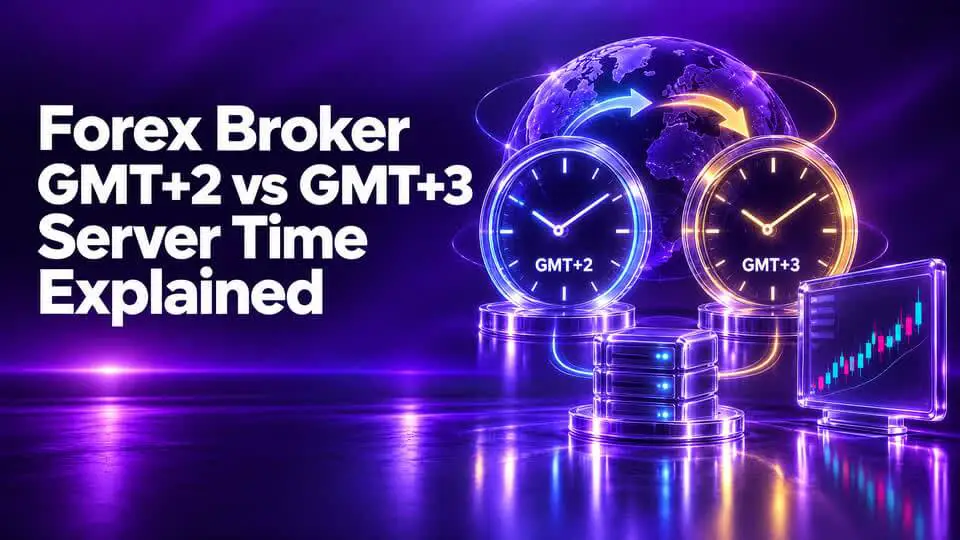
The difference between forex broker GMT+2 vs GMT+3 server time is one hour. Although that sounds minor, it can affect how traders interpret chart timestamps, calculate trading-session times, configure automated strategies, and identify the broker's daily candle boundary.
Many retail forex brokers use GMT+2 during part of the year and GMT+3 during another part, often following a seasonal schedule linked to daylight saving time. ThinkMarkets, Axi, and Vantage publish examples of this type of server-time arrangement in their official support documentation. <Link url="https://support.thinkmarkets.com/hc/en-gb/articles/11613703690385-What-is-ThinkMarkets-server-time" title="ThinkMarkets server-time explanation"/>.
However, not every broker follows exactly the same dates or rules. Traders should confirm the specific policy for their account rather than assume that every broker changes its server at the same moment.
GMT+2 means the clock is two hours ahead of Greenwich Mean Time, conventionally used in trading discussions as the reference for UTC offsets.
For example, when UTC is 12:00 noon, a GMT+2 server displays 2:00 PM.
GMT+3 means the clock is three hours ahead of UTC.
At the same moment, when UTC is 12:00 noon, a GMT+3 server displays 3:00 PM.
The difference is exactly one hour.
|
Reference |
Example time |
|
UTC |
12:00 PM |
|
GMT+2 |
2:00 PM |
|
GMT+3 |
3:00 PM |
The offset alone does not describe when the market is open. It only determines how time is displayed on the broker's platform.
Many brokers use a server-time convention that supports their trading-day schedule and daily candle structure.
A common arrangement is:
Some brokers align the change with the United States' daylight saving calendar; others describe the change in terms of European daylight saving time. Those calendars do not always change on the same dates.
Axi, for example, states that its MT4 server time is GMT+2 when New York observes Eastern Standard Time and GMT+3 when New York observes daylight saving time. ThinkMarkets describes its server as GMT+2 or GMT+3 during daylight saving time. These examples show why traders should read the relevant broker's own documentation.
|
Feature |
GMT+2 |
GMT+3 |
|
Offset from UTC |
+2 hours |
+3 hours |
|
Difference between offsets |
One hour earlier |
One hour later |
|
Possible role in broker settings |
Standard-time configuration |
Seasonal configuration |
|
Effect on displayed timestamps |
Shows the broker's current clock |
Shows the broker's current clock |
|
Changes actual market price |
No |
No |
|
Can affect EA schedules |
Yes, if fixed server hours are used |
Yes, if fixed server hours are used |
|
Can change daily candle boundaries relative to UTC |
Yes |
Yes |
The crucial point is that the underlying market does not move because the broker changes its displayed time. What changes is the mapping between market activity and the timestamps shown on the platform.
Daily candle formation is one of the most important reasons traders pay attention to server time.
A daily candle aggregates price data over the broker's defined daily period. If the server's UTC offset changes by one hour, the relationship between the candle boundary and UTC also changes.
This can influence the displayed:
Imagine a strategy that enters a trade when price breaks the previous day's high.
If the daily candle boundaries differ between two platforms, the calculated previous-day high may differ as well. One platform may show a breakout while another does not.
This does not automatically mean one broker has incorrect prices. It may mean the platforms aggregate the data using different daily boundaries.
A strategy based on intraday price action may be relatively unaffected by a daily candle boundary.
A strategy based on daily candles, however, may produce different signals when the candle definition changes.
If you compare results between brokers, make sure you are comparing equivalent time periods and candle boundaries.
Bangladesh uses UTC+6 throughout the year.
Therefore:
For example, if the time in Dhaka is 6:00 PM:
|
Clock |
Time |
|
Bangladesh local time, UTC+6 |
6:00 PM |
|
GMT+3 server |
3:00 PM |
|
GMT+2 server |
2:00 PM |
This means a Bangladesh trader using a broker that changes from GMT+2 to GMT+3 should update the conversion used for server-based trading schedules.
The change can be especially important for EAs, session indicators, and manually configured alerts.
The London and New York sessions are defined by local financial-market schedules, not by the broker's server clock.
When a broker changes its server offset, the same market session appears at a different server-clock hour.
The same issue occurs when London or New York changes its own local clocks.
For this reason, a trader should not rely on a static table that simply says “London opens at 10:00 server time” without knowing which server offset and seasonal period the table assumes.
Instead, use a current session calendar and convert the session time into the broker's current server time.
The safest method is to start from UTC.
Add two hours.
For example:
UTC 10:00 AM → GMT+2 12:00 PM.
Add three hours.
For example:
UTC 10:00 AM → GMT+3 1:00 PM.
Bangladesh uses UTC+6.
Therefore:
GMT+2 server time = Bangladesh time − 4 hours
GMT+3 server time = Bangladesh time − 3 hours
These simple formulas work for the stated offsets. If the subtraction crosses midnight, account for the change of date as well.
No, not directly.
Changing a server's clock offset from GMT+2 to GMT+3 does not, by itself, make the broker execute orders faster or slower.
Execution quality is influenced by factors such as:
Server time can affect when a time-based strategy sends an order, but it should not be confused with the time taken to process that order.
No.
A GMT+3 server is not automatically better than a GMT+2 server. The offset is a time convention.
When evaluating brokers, compare the account and legal entity that would serve you, including:
A broker's server time should be treated as an operational detail, not a ranking factor for overall quality.
Use this process before trading a time-sensitive strategy.
An Expert Advisor may contain rules such as:
If the broker changes its offset, the local time corresponding to these settings can change.
A poorly configured EA may therefore trade an hour earlier or later than intended.
Before using a time-based EA, verify:
Do not assume that an EA automatically adapts simply because MT4 or MT5 displays a new time.
Suppose Broker A uses GMT+2 and Broker B uses GMT+3.
You want to compare the same currency pair at the same market moment.
To make a fair comparison:
Without this process, a comparison may accidentally use prices from different moments.
Different brokers may follow different seasonal schedules.
Your platform clock may not match your computer or phone.
A different offset can alter daily technical levels.
The time zone does not establish execution quality.
Fixed-hour trading rules may shift relative to the market.
GMT+3 is one hour ahead of GMT+2. The difference changes the displayed server timestamps but does not independently change the underlying market prices.
Some brokers use a seasonal server-time convention associated with daylight saving time. The exact dates and reference calendar depend on the broker.
Neither is inherently better. The correct offset is the one your broker uses and your strategy handles accurately.
It changes the conversion between server time and Bangladesh local time. Bangladesh remains on UTC+6, while the broker's clock may shift.
Yes. It can affect strategies that depend on candle boundaries, session hours, daily resets, or time-based rules.
Open the platform and check its time display, then compare it with UTC. Confirm the offset with the broker's official documentation.
The difference between forex broker GMT+2 vs GMT+3 server time is simple: one hour. The consequences depend on how you use the platform.
For traders who analyze daily candles, trade specific sessions, or run automated strategies, an hour can change the timing of signals and scheduled orders. For other traders, it may be little more than a display preference.
The best approach is to verify the broker's actual offset, understand its seasonal rules, convert timestamps consistently, and retest time-sensitive strategies whenever the server clock changes.